
10 Everyday Business Tasks AI Can Do Better, Faster, and Cheaper
1. Email Sorting & Prioritization
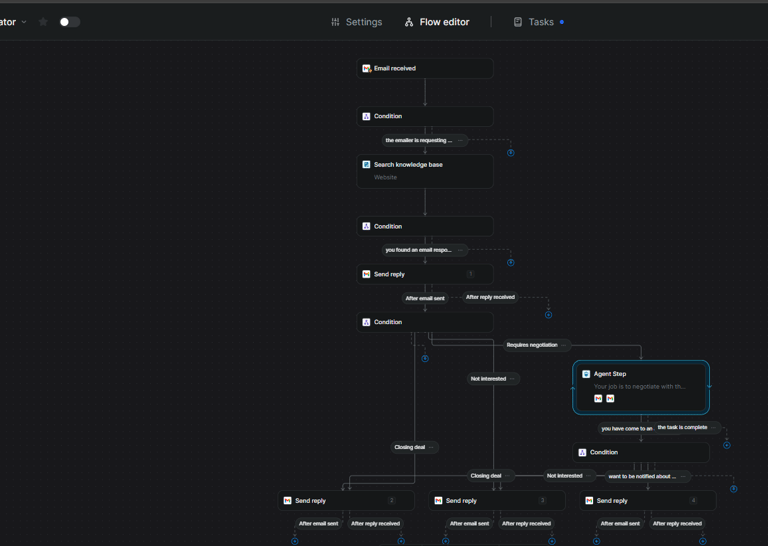
AI can scan, categorize, and flag important emails instantly, so you never miss a high-priority message. It learns your preferences, filters spam, drafts quick responses and can even conversate and close deals with prospects. This eliminates inbox overwhelm, saves hours weekly, and ensures urgent client messages are handled first for better accuracy, faster sorting, and zero wasted time.
2. Calendar & Appointment Scheduling
AI scheduling assistants automatically find free time slots, send booking links, and confirm meetings without endless back-and-forth emails. They sync across devices, consider time zones, and even reschedule when conflicts arise. This keeps your calendar organized effortlessly, saves admin hours, and avoids double-bookings.
3. Social Media Post Creation
Write captions, generate images, and suggest hashtags in minutes. It analyses audience engagement to post at optimal times and maintain brand voice. No more staring at a blank screen you get consistent, on-brand content faster and at a fraction of the cost of outsourcing.
4. Customer Service Voice & Chatbots
chatbots handle FAQs, track orders, conversate with customers and prospects and resolve common issues 24/7. They free your team from repetitive queries and escalate complex cases to humans. This delivers faster response times, higher customer satisfaction, and cost savings by reducing the need for round-the-clock human support.
5. Invoicing & Payment Reminders
Automation tools generate invoices instantly, send them on schedule, and issue polite payment reminders without manual chasing. They integrate with accounting software for error-free records. This speeds up cash flow, reduces overdue payments, and eliminates hours of manual admin.
6. Inventory Tracking
AI tracks stock in real time, predicts when items will run low, and can even automate reorders. This prevents overstocking or shortages, reduces waste, and keeps cash tied up in inventory to a minimum. Better control, fewer mistakes, and lower operational costs.
7. Data Entry & Reporting
Instead of typing data manually, AI can extract information from emails, forms, or PDFs and input it directly into your systems. It also generates instant reports with charts and insights, and can repurpose content in an automation way. This improves accuracy, saves hours of repetitive work, and gives you faster access to business intelligence.
8. Marketing Email Sequences
Create, schedule, and optimize email campaigns automatically. It personalizes content based on customer behaviour, improving open and click rates. This means you send the right message at the right time — without spending hours writing and scheduling emails manually.
9. Sales Prospect Research
Scan LinkedIn, websites, and databases to find potential customers, enrich their profiles, and rank leads by likelihood to convert. This means your sales team spends more time talking to warm leads and less time digging for contact info boosting conversions at lower cost.
10. Document Drafting, Contracts and Proposals
Create first drafts of contracts, proposals, and other documents in minutes, pulling in your branding, templates, and legal language. You simply review and finalize, cutting drafting time from hours to minutes. This speeds up deal closures and reduces reliance on costly legal drafting for routine paperwork.
Shadow AI in the Workplace: The Risk Your Team Isn't Telling You About
Your team is almost certainly already using AI. The question is whether you know which tools, for what, and with whose data.
That gap is called shadow AI: employees using AI tools such as ChatGPT, Claude, Gemini, or browser extensions and AI note-takers without approval or oversight from the business. It rarely comes from bad intent. People are busy, the tools are free or cheap, and they work. Nobody waits for a policy when a task that took an hour now takes five minutes.
That convenience carries real risks for businesses and organisations of all sizes.
The Main Issues
1. Data leakage. When someone pastes a customer email, a quote, a contract, or a staff record into a public AI tool, that information leaves your control. Depending on the tool and the plan, it may be stored, reviewed, or used to improve the model. Most people never check.
2. Compliance exposure. If personal data is involved, UK GDPR still applies, whether or not you knew the tool was being used. Customers' details going into an unapproved third-party service is a data protection problem, not just an IT one.
3. Unreliable output. AI can sound confident and be wrong. When unchecked answers go into customer replies, proposals, or pricing, the errors become your business's errors.
4. Inconsistent quality and brand voice. Five people using five different tools produce five different standards. Customers notice.
5. No visibility. You can't manage, secure, or improve what you can't see. Hidden usage also means hidden wins: your best AI workflows stay in one person's browser instead of becoming a process the whole team benefits from.
Why Banning It Doesn't Work
The instinctive response is to block everything. In practice, that usually pushes usage onto personal phones and devices, where you have even less visibility. A ban treats the symptom and ignores the reason people use AI: it genuinely helps them.
What To Do Instead
Find out what's being used. Ask your team openly, without blame. You'll learn more from a friendly conversation than from any audit.
Write a simple AI use policy. One page is enough. State which tools are approved, what data must never be entered (customer details, financials, anything confidential), and when a human must review the output.
Provide approved tools. If people have a safe, sanctioned option that works, they have less reason to go around you. Check each tool's data handling and plan terms before approving it.
Train your people. Most risky behaviour comes from not knowing the risk, not from ignoring it.
Build AI into your processes properly. Where AI is used in customer-facing workflows, such as lead follow-up, booking, or enquiries, set it up with defined inputs, limits, and human checkpoints rather than leaving it to individual improvisation.
The Bottom Line
Shadow AI is a sign that your team sees the value of AI before your business has a plan for it. The goal isn't to shut that down, but to bring it into the open and make it safe, consistent, and worth more to the business.
Unlocking Efficiency: The Benefits of an Email Agent
As small and medium-sized businesses strive for greater efficiency and smarter workflows, AI-powered automation continues to offer compelling advantages. One of the most transformative tools emerging in the space is the AI email negotiator — a solution designed to monitor your inbox for inbound inquiries and autonomously negotiate deals, ensuring every agreement aligns with your business requirements.
Why Install An Email Negotiator
For SMBs, time and resources are at a premium. Manual negotiation over email can be time-consuming, and inconsistent. An AI email negotiator steps in as a digital team member, responding to inquiries, handling negotiations, and ensuring that deals are closed within your predefined parameters personalised to each specific customer. This not only accelerates response times but also guarantees consistency in your negotiation strategy, helping you avoid missed opportunities and maintain a professional image in every interaction.
By automating the negotiation process, SMBs can free up valuable human resources to focus on more complex, high-value tasks. The AI negotiator works tirelessly around the clock, never missing an email or leaving a prospect waiting, which can significantly improve customer satisfaction and conversion rates1.
Seamless Integration Across Your Workflow
One of the standout features of modern AI email negotiators is their flexibility in how they can be triggered and integrated into your existing systems with a human in the loop where required:
Generative Chatbot Service: Imagine a prospect engaging with your website chatbot, expressing interest in your services. Responses from the chatbot can trigger the AI email negotiator to follow up with a personalized offer or continue the negotiation via email, bridging the gap between conversational AI and traditional communication channels.
CRM Integration: For businesses already leveraging AI-powered CRMs, the email negotiator can be set to activate when a new lead or opportunity is logged. This ensures that every inquiry is handled promptly and in alignment with your sales strategy, while all interactions are tracked within your CRM for full visibility and analytics. Emails can also be designated to various teams for example; High-Value leads, and Lower-Value leads.
Google Sheets Automation: If your business tracks leads or inquiries in Google Sheets, simple automations can trigger an email negotiator based on new entries or status changes. This approach is particularly useful for SMBs seeking low-cost, scalable automation without complex infrastructure.
Direct Email Inquiry: Of course, the AI negotiator can also be triggered purely by inbound email inquiries. With advanced inbox monitoring, the system detects relevant messages and initiates negotiations automatically, ensuring no opportunity slips through the cracks1.
Practical Insights and Forward-Thinking Advantages
Implementing an AI email negotiator is not just about saving time it’s about elevating your business processes to be more data-driven, responsive, and scalable. AI ensures that every negotiation is informed by your latest business rules, pricing models, and customer data. Additionally, it can analyse negotiation outcomes over time, providing insights to refine your strategy and improve win rates.
Integration does present challenges, particularly around compatibility with legacy systems and ensuring data privacy. However, these can be addressed through robust data governance, secure AI platforms, and the use of APIs or middleware to connect new AI tools with your existing workflow under SOC compliance rules.
Conclusion
For SMBs looking to stay competitive in a rapidly evolving digital landscape, adopting an AI email negotiator offers a clear path to greater efficiency, consistency, and customer satisfaction. Whether triggered by a chatbot, CRM, Google Sheets, or direct email, this technology empowers your business to respond faster, negotiate smarter, and close more deals automatically and reliably.
As AI continues to evolve, embracing these innovations will be key to unlocking new growth opportunities and staying ahead of the curve.
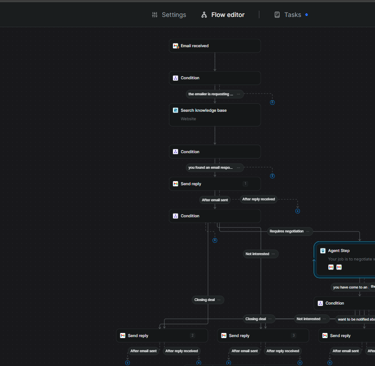
Below is an email automation workflow that is fully functional. Click on the link to see a demo of how it works and its useful case.
How To Build A Custom GPT - Your Very Own Personal AI Assistant
The very first step is to sit down with a pen and pad and write out what exactly you want your custom GPT to do. This will be easier to apply and render a sense of brainstorming as you build out your custom GPT especially when it comes to the “Instructions” (prompting) section
1. Go to https://chat.openai.com/gpts
2. Click “Create” top right-hand corner
3. Click “Configure” unless skilled in prompting and have a real specialised project plan in which case click “Create” and configure your prompt — but for ease of use click “configure”
4. Fill out the sections below that you’ll see in your GPT panel:
Name — Give your GPT a name
Description — What it should do How it behaves and what it shouldn’t do
5. Instructions should follow the below prompt format:
You are a specialist……
Your role is…….
Your tone should be (brand voice)…..
Avoid…..
Always do/explain/suggest….
Your expertise is/are…..
6. Add your “Conversation Starters”, These will be the six pre-filled text boxes shown on the front page of your GPT when complete and deployed.
Example: How can AI help my business?
Example: Write me marketing material for….
7. Add your knowledge Base — PDFs, reports, docs etc.
NOTE: You cannot directly add your website URL into a custom GPT’s Knowledge Base. But you can add your website files and upload them as files.
8. Leave “Recommended Model” as its default (no recommended model)
9. Turn the “Capabilities” section on according to what you wish to have external access to. Generally tick all except the “coding” element unless you require this obviously.
Happy experimenting.
Prompt Engineering Concepts-What the heck do these mean?
The AI world is full of buzz words and terminologies that tend to make things way more complex than already is. Lets break down and explain as basic as possible a few of the Prompting terminologies that seem to be all the buzz on the internet today.
1. LLM-Large Language Models = ChatGPT Claude Gemini:
. Large for vast amounts of data
. Language for translation of grammar, context, cultural reference etc
. Model for computing algorithms
2. Prompt:
The general phrase for the input of data into a model such as ChatGPT to render an expected output.
3. Prompt Engineering:
Designing effective prompts in a structured way to give the LLM targeted and directed statements for accuracy in results. This technique helps the LLM algorithms to home-in on specific data sets instead of broad data sets when finding and outputting results.
Example: Define a Role, Context, Task, and Format, in your query especially when looking for complex or detailed outputs.
4. Chain-of-thought prompting:
Having a conversation with AI. Asking the AI to break tasks down into smaller steps. Lets say you prompt ChatGPT to output the outline of an ebook, you likely want to amend or adjust whatever it outputs. Chain-of-thought prompting is the case of having a back and forth conversation with ChatGPT or any other LLM enabling it to follow your exact thought process until you have the exact output required.
5. Few-shot prompting:
Giving your prompts examples. Basic example gist: “I am looking to hire a team of construction workers for an upcoming project on my house”.
Example: Painters & Decorators
Example: Carpenters
Works extremely well when prompting to narrow down lengthy explanations but laser targeted for accurate results.
As explained in point 1, AI works on large amounts of data. In fact the whole internet is an LLM’s knowledge-base. This is why prompting effectively is an important hack to know in order to narrow down vector searches. A little like keyword searches in Google but more complex and in a different format.
The cost effectiveness isn’t an issue with ChatGPT, Claude, etc on the paid versions unless you are using advanced features such as video generation or Claude-Cowork/Code in which case strategic prompting is key in order to get your required output before credits run low which would result in having to pay manually for more credits or upgrade your subscription to a higher tier.
6. Vibe-coding: Rapidly becoming hot in the SaaS (software as a service) arena where developers build out sophisticated websites and apps using natural language prompts that instruct AI agents to build things.
When using vibe-coding platforms and tools, costs are associated with prompts and can be costly, so the more effective you can prompt, the quicker you reach your results = the more cost effective your build.
Automation Workflow For Property Let Company
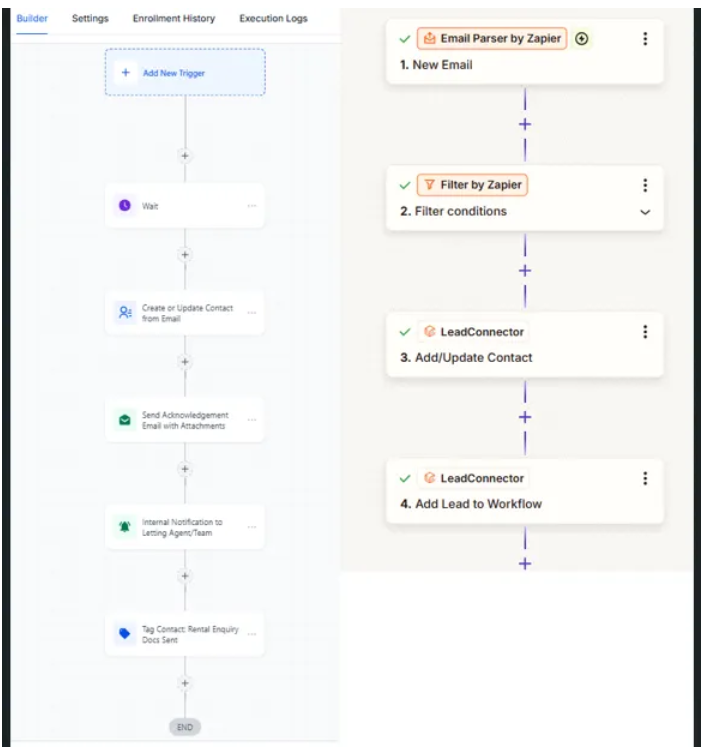
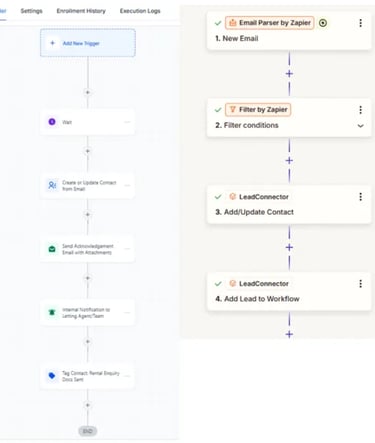
Below is a snippet of a workflow automation that I implemented for a property management letting agency recently that collects leads from website webforms and brings into Zapier where they are filtered and created/updated which then triggers a GHL workflow to send out required documents.
This process alone is saving my client approximately 1 hour a day which is 5 hours a week which is 20 to 25 hours a month in otherwise manual tasks.
When a customer enquiry comes in from an online property rental portal the automated workflow on the right gets triggered processing various filters and qualifications. If all conditions are met, it then triggers the workflow on the left which sends out the required documents to the potential tenant, in this case Terms & Conditions and profile documents.
Blogs
RAG & Prompt Engineering For Accuracy
The Synergy of Retrieval-Augmented Generation and Prompt Engineering For Accurate Outputs.
In the landscape of artificial intelligence, there are two methods that are critical for optimizing large language models (LLM) performance:
Retrieval-Augmented Generation (RAG) and prompt engineering. Together, they address key limitations of standalone LLMs such as outdated knowledge and context gaps while enabling users to generate precise, reliable, and actionable outputs. Lets look at their individual yet combined roles that are all so critical for the required output.
The Role of Retrieval-Augmented Generation (RAG)
RAG is an AI architecture that enhances LLMs by connecting them to dynamic external knowledge bases, such as internal databases, scholarly journals, or real-time data streams. Traditional LLMs (chatbots for example) rely solely on static training data, which can lead to inaccuracies or hallucinations when faced with niche queries or evolving information. RAG solves this by first retrieving relevant documents or data snippets from external sources and then integrating this context into the generation process.
RAG offers the below advantages:
Accuracy by grounding responses in verified, up-to-date sources, RAG reduces errors and ensures factual correctness.
Cost Efficiency Organisations avoid the expense of retraining models by dynamically updating external knowledge bases.
Domain Specialization: RAG tailors outputs to specific industries, such as finance, logistics, or healthcare, by leveraging proprietary data.
For example, a customer support chatbot powered by RAG can pull real-time product details from a company’s database, ensuring responses align with the latest data and specifications.
The Precision of Prompt Engineering
Prompt engineering involves crafting structured, context-rich instructions to guide LLMs toward a desired output. While RAG provides the data, prompt engineering shapes how the model processes and presents that information. Effective prompts are clear, specific, and iterative, often incorporating techniques like:
Role assignment “You are an expert marketer....
The Task: What do you want to happen, what output results are you looking for.
Context: Give plenty of details of the subject you are tasking. Upload files, PDF's, snippets of content and reports if need be so that the LLM has as much knowledge and information as possible for what its tasking.
Also give the context a tone of voice such as, be educational, conversational, happy, enthusiastic, persuading etc.
Format: CSV, PDF, markdown, table, spreadsheet, plain text and so on.
Note: When designing and writing prompts for building AI agents and automation workflows there is a learning curve and a level of skill involved to get things running correctly and smoothly (a little outside of the scope of this topic as the approach is completely different but just a pointer) but for the everyday ChatGPT, Claude, Perplexity, Gemini etc, generally these are the steps to follow.
How RAG and Prompt Engineering Work Together
The integration of RAG and prompt engineering creates a feedback loop that maximizes AI utility:
Context Enrichment: RAG retrieves relevant data, which is then embedded into the prompt. For example, a query about blockchain security risks might pull the latest audit reports from a knowledge base that's been uploaded a chatbot or a workflow funnel system.
Instructional Guidance: Prompt engineering frames the retrieved data into actionable tasks, such as “Compare these three blockchain audit reports and list the top vulnerabilities”.
Output Optimization: The model synthesizes both the external data and prompt structure to generate concise, citation-backed responses.
This synergy is particularly valuable for applications like:
Research Assistance: RAG gathers peer-reviewed studies, reports, whitepapers, files, while prompts instruct the model to analyse methodologies.
Regulatory Compliance: Legal teams use RAG to access updated policies, with prompts ensuring outputs adhere to specific jurisdictional requirements.
Conclusion
RAG and prompt engineering are not competing approaches but complementary forces. RAG ensures LLMs have access to the most relevant and current information, while prompt engineering sharpens their ability to interpret and apply that pin-pointed knowledge in whatever way you require.
Together, they enable organizations to deploy AI systems that are both knowledge-aware and user-aligned with greater trust for accurate results, reducing reliance on generic outputs and fostering trust through transparency.
As AI adoption grows, the organisations that master this combination will lead in delivering precise, context-rich solutions whether automating customer interactions, generating technical content, or supporting decision-making with real-time data.
Prompt Engineering particularly when building AI systems is fast becoming a major skillset by itself and could see job opportunities specifically in this field alone in the not so far future.
By bridging the gap between static training data, and dynamic real-world needs, RAG and prompt engineering will redefine what’s possible in the age of intelligent automation.
Businesses that delay adoption beyond 2026 face a stark reality
The clock is ticking for businesses to integrate some kind of AI automation process into their operations. Companies that delay adoption beyond 2026 will face unprecedented times. Escalating customer acquisition costs (CAC) and protracted product development cycles will be the result compared to AI-equipped competitors. As industries accelerate toward AI-driven innovation, hesitation now could cement long-term disadvantages in efficiency, market agility, and profitability.
Rising Customer Acquisition Costs
AI’s ability to personalize marketing and automate lead targeting directly impacts CAC. Businesses leveraging AI tools like predictive analytics and dynamic ad optimization can reduce this by up to 50% by identifying high-value prospects and tailoring campaigns to individual behaviours as a result of autonomously optimizing multi-channel ad spend, and ensuring budgets target the most responsive audiences. Companies relying on manual processes will inevitably get left behind facing inflated costs due to inefficient ad bidding wars, autonomous targeting, and generic outreach. As competitors deploy AI chatbots for 24/7 customer engagement and real-time personalization, businesses risk losing market share while spending more to attract fewer customers.
Slower Product Development Cycles
AI compresses product lifecycles by automating tasks like prototyping, testing, competitor and market analysis. AI also identifies unmet customer needs through real-time data analysis, allowing businesses to align innovations with market demand faster than traditional R&D methods. Without AI automations, product teams waste months on manual data parsing and risk HiPPO bias (highest-paid person’s opinion) overriding data-driven decisions.
The result? Competitors launch superior products first, capturing early adopters entirety and brand loyalty, first.
Strategic Risks of Delay
The gap between AI adopters and latecomers widens exponentially. Early adopters like Netflix and Amazon already use AI to refine customer experiences and operational workflows, creating self-reinforcing competitiveness. Meanwhile, delayed adoption forces businesses into reactive spending to modernize outdated systems, a costlier endeavor than an AI integration. Enterprises are absolutely all over the AI arena when it comes to marketing, personalising, and specific targeting of audiences and genres, now SMBs have the same advantage for their businesses too.
The Bottom Line
2025 marked a critical inflection point, and 2026 onwards is the adoption stage. Businesses that defer automation adoption risk irreversible setbacks. 12 months from now, the business and marketing front is going to look very different. Higher CAC, slower innovation, and eroded margins are going to be inevitable.
Conversely, early adopters gain first-mover advantages in customer loyalty, operational efficiency, and market agility. The choice is clear , accelerate AI integration now or lose ground to competitors already redefining industry standards.

Get in touch
© 2025 Exceel Automation- All Rights Reserved.